
Customer Information
We just wanted to let you know that we will be on holiday from 17th Sept > 7th Oct.
🏝 🍹 🪷
As normal, you can still place your orders during this period, to secure your favourite products then we will process and post them on our return.
This holiday is actually a part working/part leisure break as we hope to visit the location of a 200yr old DRAGON TREE.
🐲
Obviously we will be taking photos together with purchasing items made from this tree and naturally we will tell you all about it when we return. We are so excited, it will be just like when we visited Bangalore in India and found one of the three Champa tress used to manufacture NAG CHAMPA products.
Keep safe and well,
Namaste 🙏
Barbara & Brian xx
Take a look at our products and read our information pages, you may be surprised by what you see!

INCENSE ~ Sticks, Cones and Dhoop ~ High Quality & Traditionally Made by Top Rated Producers, many are unknown by regular Incense users.
Natural & Chemical Free so NO HARMFUL BLACK SMOKE!
Amazing Fragrances from Brands Outstanding

ALCOHOL-FREE PERFUME OILS ~ Highly Scented that will "Lasts for Hours".
Also suitable for use in Oil Burners, Aromatherapy Jewellery & when using a USB Diffusers.

AROMATIC OILS ~ Free from Chemicals, Eco-Friendly & NEVER tested on Animals. Affordable items. Suitable for use in USB Diffusers & Traditional Oil Burners
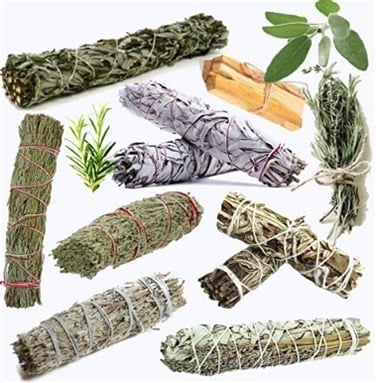
SMUDGING PRODUCTS ~ Everything you need to Purify, Cleanse or Remove Negative Energy from People & Environment. Natural, Authentic & Unique items from beginners to experienced users, plus we also offer Resins in Charcoal cups within this section . . .

TEA LIGHTS ~ Variety of Natural & Beautifully Fragranced 4hr long Waxes. Amazing Scent & High Quality Waxes from a Brand with a Royal Warrant !

Himalayan BATH SALTS & SCENTED SOAP
~ Perfect for improving Wellbeing. "Mother Nature's" Products, Genuine Salts that can be used in a Relaxing Bath, or an Exfoliator.

GIFTS ~ A Unique collection of Affordable, Unique & Quality Products to suit Anyone, for any Occasion.

ACCESSORIES ~ Quality items to complement all our Aroma Oils, Wax or Perfume Products.

ACCESSORIES ~ Many Fair Trade items to complement all Incense & Resin Products.

REDUCED TO CLEAR ~ From Incense, Aroma Oils to Wax Melts, Cupcake Melts & Accessories
Click on this text to start editing, and enter your own text with some basic formatting. To create a link to another page or website within this section, select the text you want to make into a link and click on the Link icon on the formatting toolbar. Click anywhere outside the text box when you're done to continue working on the rest of your page.
To change the appearance of a block, such as the way in which it is laid out and the width of its columns, click on the Change Layout button on the block toolbar, to the right of each block. Additional elements can be added to the block by clicking the Add Element + icon displayed when moving your cursor within the block. You can delete an element (e.g. a button) by clicking it and then clicking the bin icon.
You can change the order that blocks appear on your page using the up and down arrow buttons on the right hand toolbar, or you can drag the entire block using your mouse.